Guide / Work
HelpToday
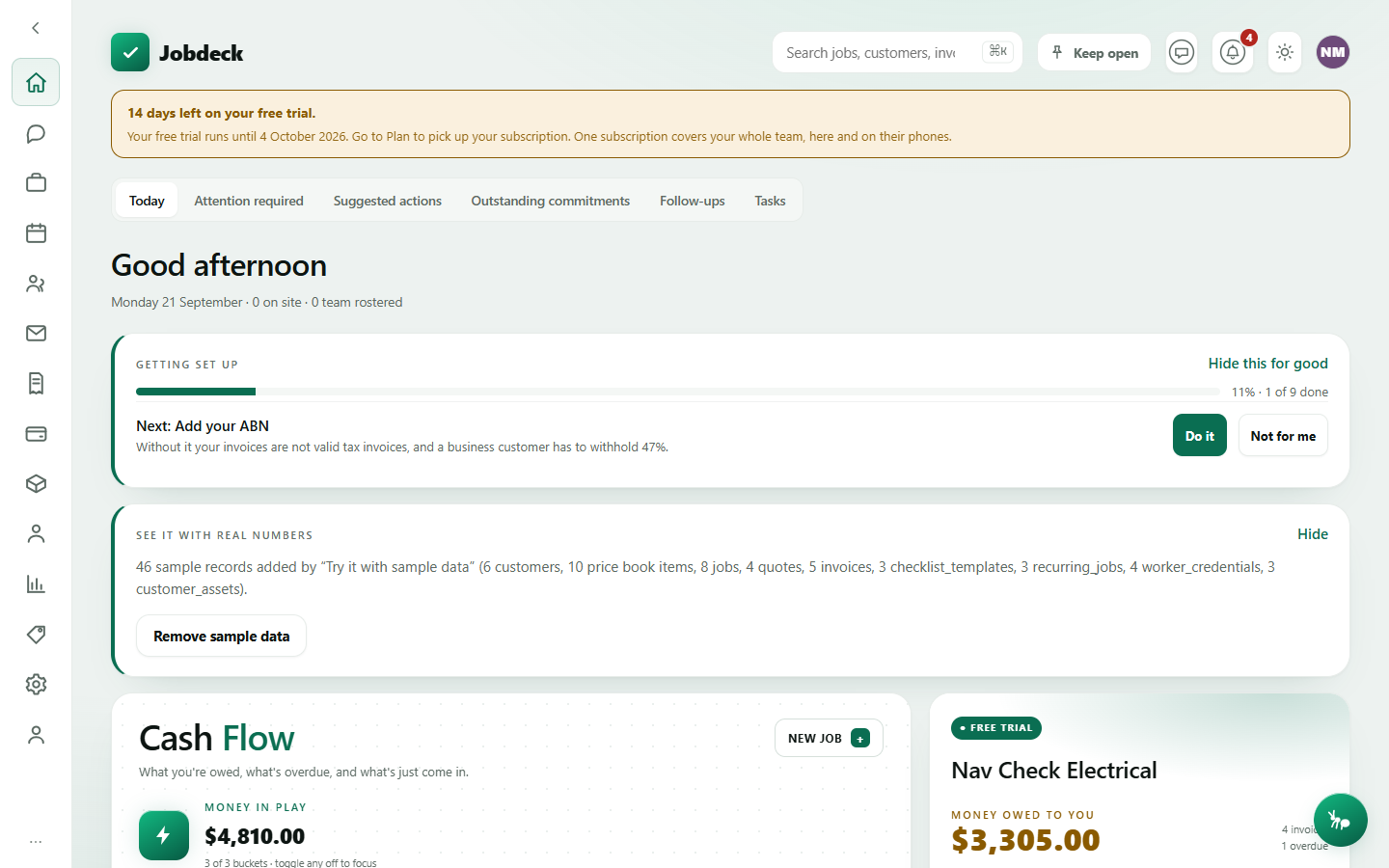
Your morning cockpit — cash flow, who's owed what, who's on site, and a jump straight to the next job. It's also where five separate "what needs me" screens get boiled down to one glance, each of which is its own full screen underneath.
Today / manager
- What it's for
- The screen the boss opens first. Cash flow, who's owed money, who's on site right now, and what to do about it — plus a one-off setup checklist that disappears for good once you've finished it.
- Controls
- Three Cash Flow toggles (Overdue / Due soon / Collected · 30d) switch each bucket in or out of the "Money in play" total, so you can look at just the part that matters right now.
- Buttons
- New job, Open (next job), Open the schedule, Do it / Not for me on the setup checklist, Open the list → into the full Attention required screen.
- On the page
- A greeting with on-site and rostered-team counts; the Getting set up checklist while your account is new; the Cash Flow diagram with its proportion bar; a Money owed to you hero with a collection-rate gauge; Today at a glance tiles (on site, team today, overdue, estimated margin); a Next job card; an Attention required summary with the server's own reason on each row, not just a count; then On site now, Where the team are (with a link straight into Maps), Missing diaries and Live job costs lists.
- Takes you to
- A specific Job, Jobs (New job), the Schedule, and the full Attention required screen.
A dash means the figure was withheld, not that it's zero. Anyone without permission to see money gets "—" on every money field on this page, never $0.00 — a $0.00 reading is a claim about the job, and Jobdeck won't make one it can't back up.
The five sections below are what "what needs me" used to be spread across. Each is a full screen in its own right, reachable from Today's Attention required panel or straight off its own address.
Attention required /triage
- What it's for
- Every job that's stalled — not booked and not parked in a queue with time left on it — plus everything currently on your own desk: overdue jobs, quotes gone quiet, unpaid invoices, missing diaries and your own licences running out. Every row carries the reason in a full sentence, never just a count.
- Controls
- Sortable columns on both tables (how long it's waited, how far overdue, what it's worth).
- Buttons
- None that change anything — every row just opens the record it's about.
- On the page
- Two counts (Action required / For my review); a table of stalled jobs with what's wrong and how long they've waited; a table of what's on your desk with why it's there; a note naming any parking queue that never expires, since nothing pushes a job back out of one of those on its own.
- Takes you to
- The relevant Job, Quote or Invoice.
Suggested actions /suggested-actions manager
- What it's for
- Work Jobdeck thinks is worth doing, with the evidence behind each suggestion and what happens if you accept it. Nothing on this screen sends, chases or bills anything on its own — it only proposes, and it says so on every row.
- Controls
- Open / Done / Dismissed filter; Check now asks the server to look for anything new straight away.
- Buttons
- The record's own action (e.g. open the invoice it's about), I have handled this, and Set aside for good — a permanent dismissal, said before you press it, because that record will not be raised again.
- On the page
- One card per suggestion: what it proposes, the evidence that raised it, and what accepting it does.
- Takes you to
- Whatever record the suggestion is about — an invoice, a quote, and so on.
Outstanding commitments /promised
- What it's for
- Everything the business has told a customer it will do and hasn't done yet, pulled from six different places — accepted quotes with no job raised, live jobs, approved variations, unclaimed stages of a claim schedule, prepaid hours nobody has drawn down, and service plans overdue a visit — on one list, ordered by how far past its own promise each one is.
- Controls
- A kind filter, to see just one of the six registers at a time.
- Buttons
- None — this is a read-only register.
- On the page
- Four count tiles (outstanding, past their date, still to come, no date on them); a table of dated promises, most overdue first; a separate table for undated ones, which are not counted as late — nobody set a date, so it isn't broken, it's just missing.
- Takes you to
- The Job behind each promise, where one exists.
Follow-ups /follow-ups
- What it's for
- Every note anyone put a follow-up date on, from jobs and from customers, in one list. "Ring the Prestons site back Tuesday" and "ring Dave at Acme back Tuesday" are the same kind of promise, so they're one list, not two.
- Controls
- Whose (everyone you can see, or one person), Late only, Include ones already done.
- Buttons
- Tick off / Put it back, and Drop the date — turns the follow-up back into an ordinary note rather than marking it done.
- On the page
- A table showing when it's due, what the note says, which job or customer it's on, who it's assigned to and the date.
- Takes you to
- The Job or Customer the note is on.
Tasks /tasks
- What it's for
- The office to-do list for the non-job work that still needs doing — order the switchboard, call the strata manager.
- Controls
- Open / Mine / Done filter; a collapsed task-templates panel for anything you do the same way every time.
- Buttons
- Add task; tick to complete; Delete.
- On the page
- A quick-add form, then task rows with a due date (flagged once overdue), an assignee, and a link to the job if one's attached.
- Takes you to
- A linked Job.