Guide / Work
HelpSchedule
Who is on what, whether the day adds up, and the jobs still waiting for a date. Nine ways of looking at the same roster and job calendar, plus five related screens for the route, bookings and dispatch questions that come up while you're looking at it.
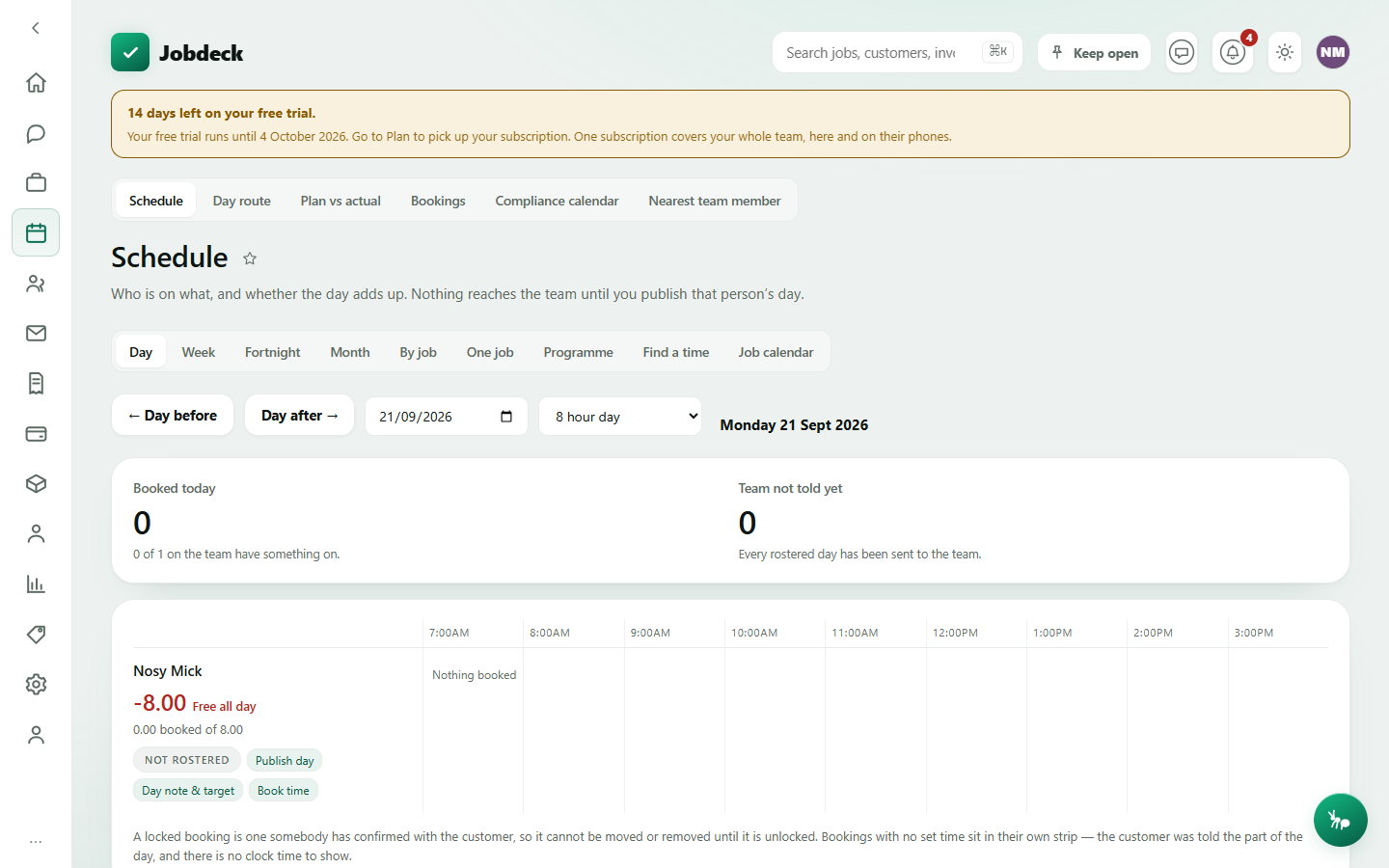
Schedule /schedule
- What it's for
- The dispatch board. Nine tabs look at the same underlying roster and job calendar from different angles, so moving between "what's on Tuesday" and "is Byron short this week" doesn't cost a page reload or a lost scroll position.
- Controls
- Nine view tabs — Day, Week, Fortnight, Month, By job, One job, Programme, Find a time, Job calendar. Anyone without the permission that puts people on work only ever sees Job calendar; the other eight ask "what is a person doing", which is a question about their movements, so they need it. Each view keeps its own date or job in the page's own address, so a particular day is a link you can send someone.
- Buttons
- Vary by view — a schedule dialog with crew tick-boxes and a site-leader picker on Day; Print run sheet; a rotating calendar-subscription link.
- On the page
- On Day/Week/Fortnight/Month, a grid of scheduled work with crew and target hours. On By job, this week's work grouped by job instead of by day. On One job and Programme, a single job's own timeline. On Find a time, a suggested slot from the route optimiser. On Job calendar, every scheduled job — the view a worker without dispatch access lands on.
- Takes you to
- A specific Job.
Day route /day-route
- What it's for
- A daily run sheet — the day's stops in time order, ready to open in Google Maps as one route or one stop at a time. Jobdeck doesn't hold coordinates (a job only ever carries a plain site address), so this leans on the map app already on your phone rather than a private mapping layer.
- Controls
- A List / Map / Route plan toggle — Route plan only appears with dispatch permission, since it's the only one of the three that can write, reordering the day rather than just showing it — and a date picker.
- Buttons
- Open route in Google Maps (every stop with an address, as one drivable route), and a per-stop Map button.
- On the page
- The day's jobs in time order with time, customer and site address. A job with no address is still listed, just not mappable.
- Takes you to
- A specific Job; Google Maps.
Bookings /bookings manager
- What it's for
- Work that turned up by itself — a customer picked a time off your online booking link, and the diary is already holding it. Confirm it, decline it, or turn it into a real job.
- Controls
- Filter by status: Waiting on you, Confirmed, Turned into jobs, Declined, Ran out of time, All.
- Buttons
- Confirm, Decline (the time goes straight back on the diary), Turn into a job (owner/admin only, since it writes both a job and a customer), plus Copy link / Copy a text message for any live booking page.
- On the page
- Each booking's requested time, contact details, any notes, whether the time is still held in the diary, and its status.
- Takes you to
- The created Job; Online booking, to set up or change a booking page.
Plan vs actual /schedule-comparison manager
- What it's for
- What was rostered against what was actually clocked, and the gap. The two are separate records — one written by the office before the work, one written by the crew as it happened — and they are expected to disagree; the disagreement is the useful part. "Rostered, nothing ever clocked on" and "clocked, nothing rostered" are both named findings rather than noise.
- Controls
- A date range; Who (everybody or one person).
- Buttons
- None — read-only.
- On the page
- Three totals (rostered, clocked, difference); a by-person table and a by-job table, both ranked by the size of the gap rather than alphabetically, each row carrying a plain-English note on what stands out.
- Takes you to
- A specific Job.
Compliance calendar /compliance-calendar
- What it's for
- Every dated obligation the business already records, on one list — crew tickets, subbie credentials, instrument calibration, plant service and registration, asset test dates, plus anything you type in yourself. It doesn't (yet) track AS/NZS standard revisions or licence-class changes, and says so rather than letting an empty section read as "nothing is due".
- Controls
- A how-far-ahead horizon (30, 60, 90 days and so on).
- Buttons
- Add a hand-typed entry, for an obligation you keep in your head but have no register for (needs the settings permission).
- On the page
- A banner naming what this calendar can't cover; sections for due, undated and no-source obligations, each with where it came from and how it was worked out.
- Takes you to
- Nothing else — the source records (Licences, Plant, Client assets) are edited from their own screens, not from here.
Nearest team member /who-is-closest manager
- What it's for
- Dispatch triage for one job — who's actually closest to it right now, and what else is going on nearby. Every distance shown is a straight line, said on every row, never an ETA. Nobody who isn't sharing their position is ranked as "zero kilometres away", and the screen picks nobody — it shows availability alongside proximity and lets a person decide.
- Controls
- A job picker (this same panel is also the Nearby tab on a job, where the job is already chosen); a search radius.
- Buttons
- None that change data — it's a read-only ranking.
- On the page
- Crew ranked by distance, with anyone whose position is unknown listed separately rather than silently dropped; other booked jobs and gear under service nearby; any prior work already done at this exact address.
- Takes you to
- A specific Job.