Guide / Work
HelpJobs
The master list of every job, plus six other ways of looking at the same work — the board, this week by job, projects, site diaries, site reports and the knowledge base.
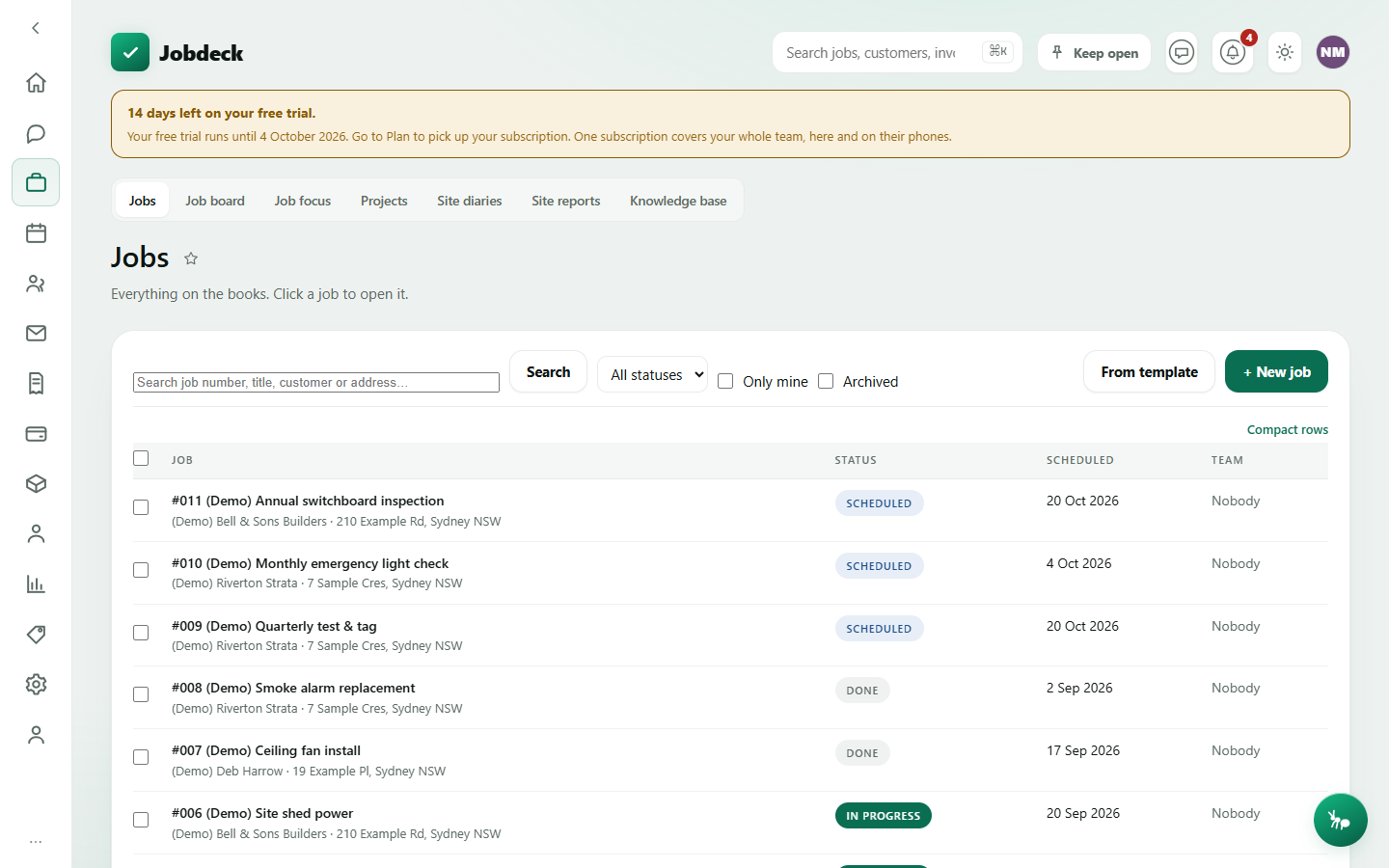
Jobs /jobs
- What it's for
- The register of every job in the business — search, filter, bulk-update status, create new ones, open any of them.
- Controls
- Search box; status filter; Only mine; Archived; tag filter; Clear filters.
- Buttons
- From template, + New job, and — once you've ticked some rows — a bulk Change status to… with Undo.
- On the page
- A sortable table: Job (number, title, customer/site), Status, Scheduled, Team.
- Takes you to
- A specific Job.
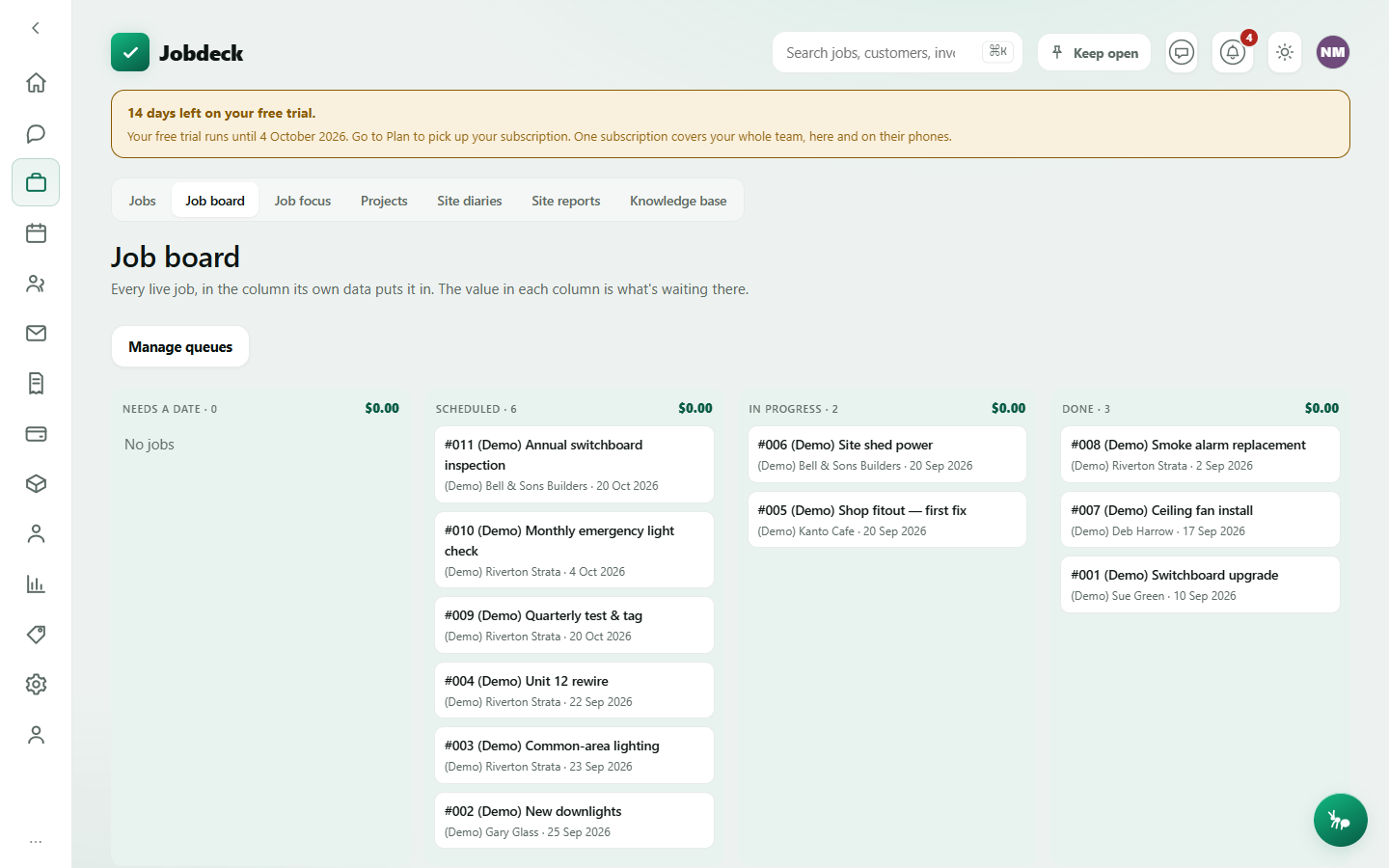
Job board /board manager
- What it's for
- The same live jobs as a card wall, sorted into a column by the job's own data rather than dragged there by hand — so the board can't drift out of sync with what's actually true of a job. Each column header totals the sell value sitting in it, so $18k of work with no date is visible at a glance.
- Controls
- Manage queues — add or delete your own named holding columns ("Waiting on parts", "Chase next month") and give one an expiry, so a job parked past it is flagged and pops back into view rather than being forgotten.
- Buttons
- Add queue, per-queue Delete.
- On the page
- Columns with a count and total value; job cards flagged orange once a job's waiting for a date, red once it's been waiting 30 or more days.
- Takes you to
- A specific Job.
Job focus /job-focus
- What it's for
- This week's scheduled work as one card per job instead of one row per day — the question "who's on the Smith reno this week" rather than "what's on Tuesday". The by-job companion to the Schedule board.
- Controls
- Previous week / This week / Next week.
- Buttons
- None.
- On the page
- One card per scheduled job: number, title, customer/site, date and time, and the assigned team.
- Takes you to
- A specific Job.
Projects /projects
- What it's for
- A programme of work that sits above the jobs — one signed contract, several jobs under it, one link your customer can follow for progress. The link shows stages only, never a dollar figure.
- Controls
- None beyond the table itself — there's no filtering, just the list.
- Buttons
- Start a project (owner/admin).
- On the page
- A table of projects with status, dates, how many jobs are under each one, and whether a customer-facing link is currently shared.
- Takes you to
- A specific Project's own detail page, and the individual Jobs under it.
Site diaries /diary manager
- What it's for
- Which crew on a live job still owe you a site diary for a chosen day, so you can chase the gap. Today's cockpit shows this for today only; here you can pick any date.
- Controls
- A date picker and a Today button.
- Buttons
- None — clicking a row opens the job it's about.
- On the page
- A Missing diaries list of crew and the job they owe it on, or "Everyone's up to date" when there's nothing to chase.
- Takes you to
- The relevant Job.
Site reports /site-reports
- What it's for
- What the crew wrote up on site — variations, delays, instructions — read by the office. It defaults to the view that costs money if it's missed: chargeable work nobody has marked as billed yet.
- Controls
- Not yet billed / All chargeable / Everything filter; a kind filter.
- Buttons
- Mark billed (records what was done about it, e.g. "billed on invoice 1042"), Delete (managers only, for a genuine duplicate — a report is a record, so this is worded as such).
- On the page
- A table of reports: reference, what happened, kind, when, which job, and whether it's been billed.
- Takes you to
- The Job it was filed against.
Knowledge base /knowledge
- What it's for
- How this business does things, written down once. The "before you go" panel at the top is the actual point of the screen: pick a job and it lists what's worth reading before you get there, with a plain-English reason for each one ("written for this customer", "written for this kind of work", "pinned for everyone") — rather than a search box waiting for you to already know an article exists.
- Controls
- A job picker for "before you go"; search, category filter and Show archived for the library underneath.
- Buttons
- New article, Pin / Unpin, Archive.
- On the page
- The before-you-go panel; the article library with title, category, tags and pinned flag.
- Takes you to
- Nothing else — an article opens in a panel on this same screen.