Guide / Money
HelpReports
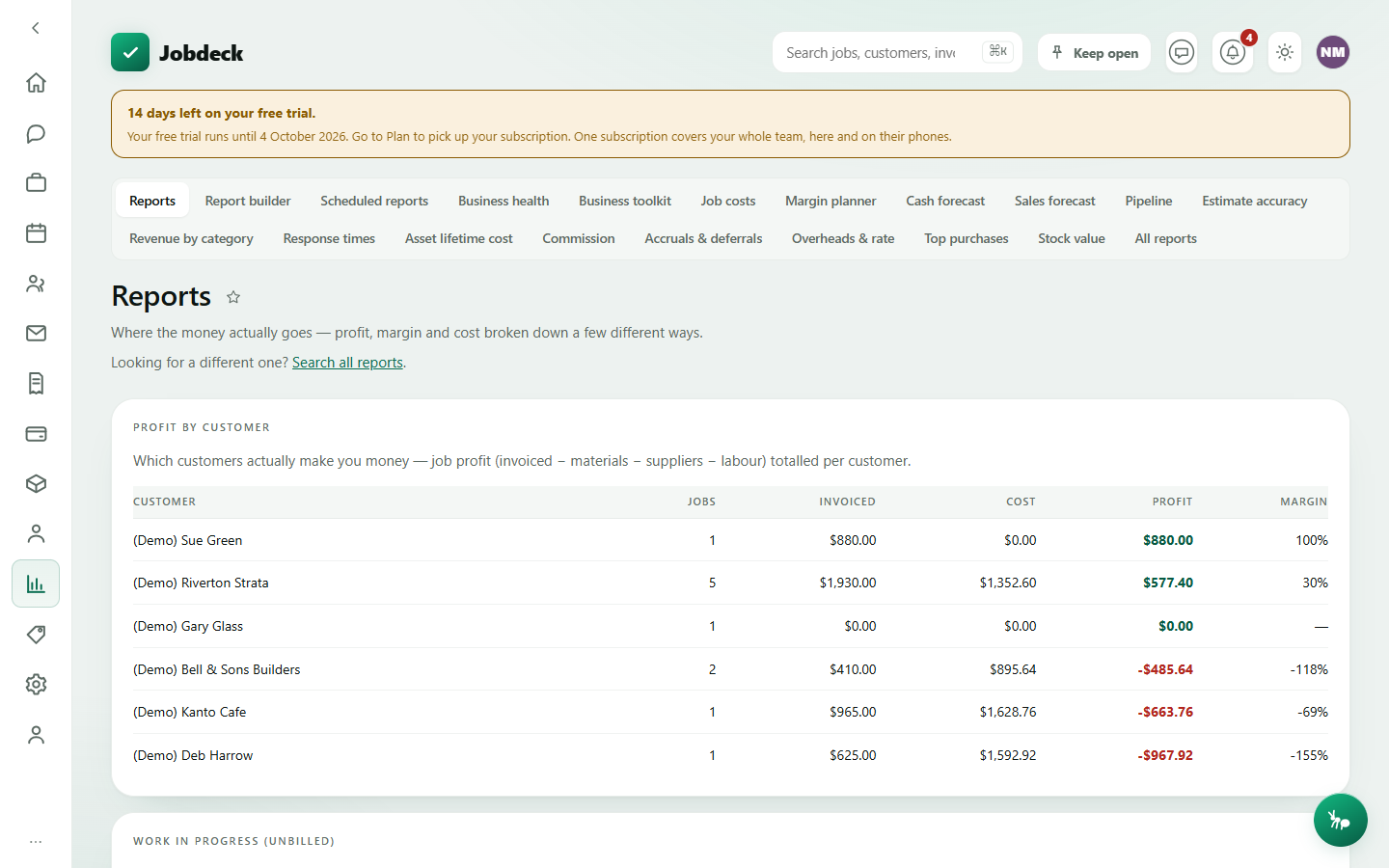
A hub for the reports you check most often and the exports your bookkeeper needs, plus a search box into the rest. Eighteen reports live under this one area — this page covers the hub itself, four you can see below in full, and the other fourteen in one table.
Reports /reports money
- What it's for
- The financial reports and exports you'd reach for weekly, plus Search all reports into the other seventeen.
- Controls
- Date range for the BAS pack and the TPAR export; date range and basis (Cash / Accrual) for the GST summary.
- Buttons
- Download BAS pack (ZIP), Download TPAR (CSV), Download payroll CSV, Download full data export. The full data export and the payroll CSV both work even on a read-only account — they're the way you get your data out if you ever stop paying.
- On the page
- Profit by customer (jobs, invoiced, cost, profit, margin); Work in progress — active jobs you've spent more on than you've invoiced; Price discrepancies — a material that's cost you more than one price, with the spread and whether it's trending up; BAS & tax-time exports; Payroll hours (a timesheet CSV, not a pay run — Jobdeck doesn't calculate pay, tax, super or lodge STP); Full data export; GST summary (collected, paid, net, labelled cash or accrual so it's never ambiguous which one you're looking at).
- Takes you to
- Search all reports, the catalogue of the other seventeen.
Every report needs the view_money permission — one of twelve permissions that can be given to any member, not only owners and admins. Thirteen of the eighteen also open to the free read-only accountant seat. Four — Business health, Cash forecast, Commission and Accruals & deferrals — need view_money on its own, with no accountant exception. Report builder needs no permission at all: money figures are checked one metric at a time inside it, so a crew lead without view_money can still ask how many jobs got finished this month.
Four you'll actually see
The rest of the catalogue is built to be read, not browsed — see the table below. These four are worth a proper look, because they're the ones you're most likely to open and stay on.
Business health /kpis money
- What it's for
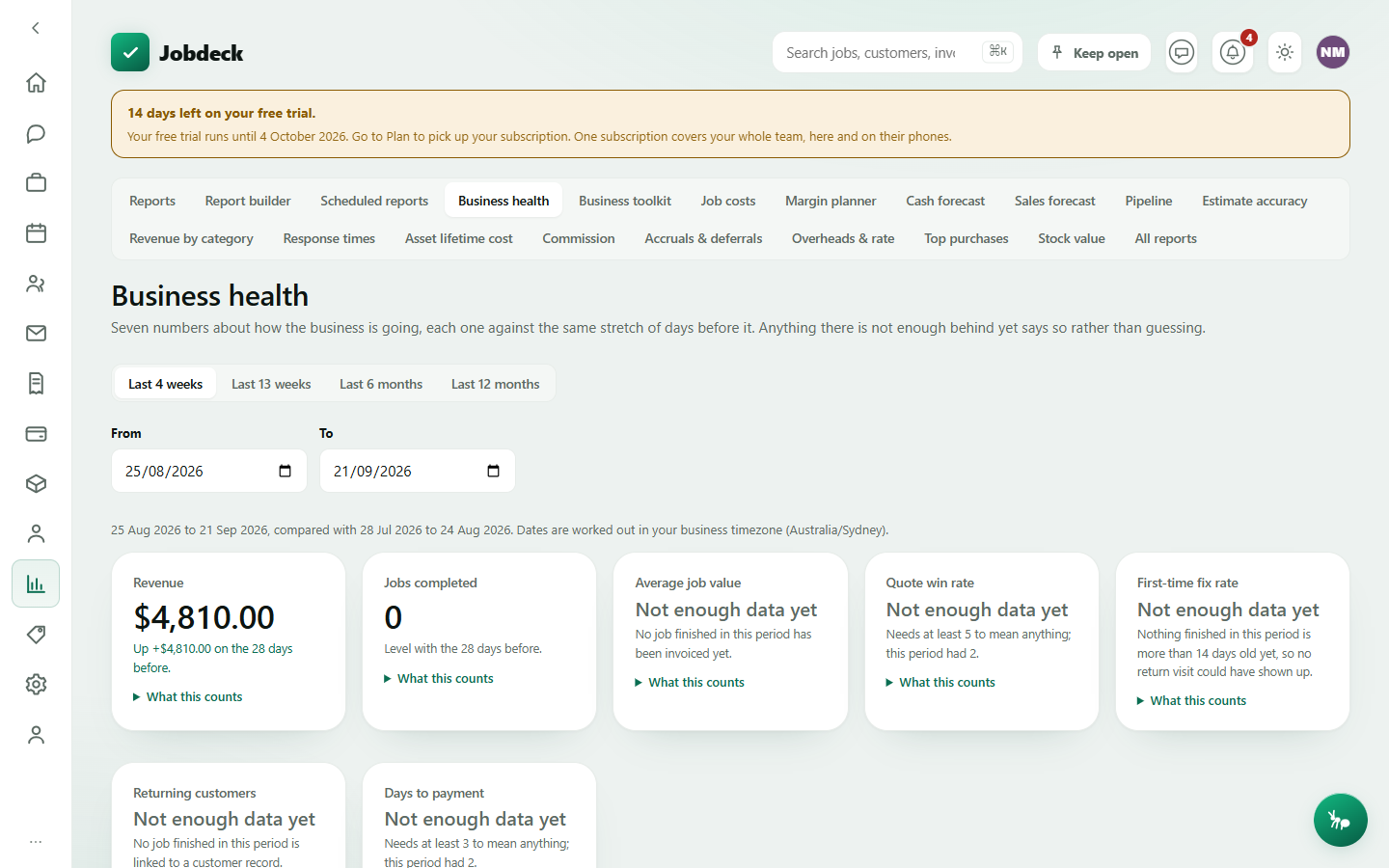
- Seven numbers that say whether the business is going the right way — revenue, jobs completed, average job value, quote win rate, first-time-fix rate, returning customers, days to payment — each measured against the same stretch of days immediately before it.
- Controls
- Period presets (last 4 weeks / 13 weeks / 6 months / 12 months), or your own From/To dates.
- On the page
- A card per metric. Anything without enough history behind it says so in plain English — never a flattering zero and never a 100% off one quote. A "What this counts" link on every card spells out exactly what it's measuring. Below that, what customers said (star rating and spread) and, if it applies, a card naming what got left out and why your other screens might not match.
Business toolkit /business-toolkit money
- What it's for
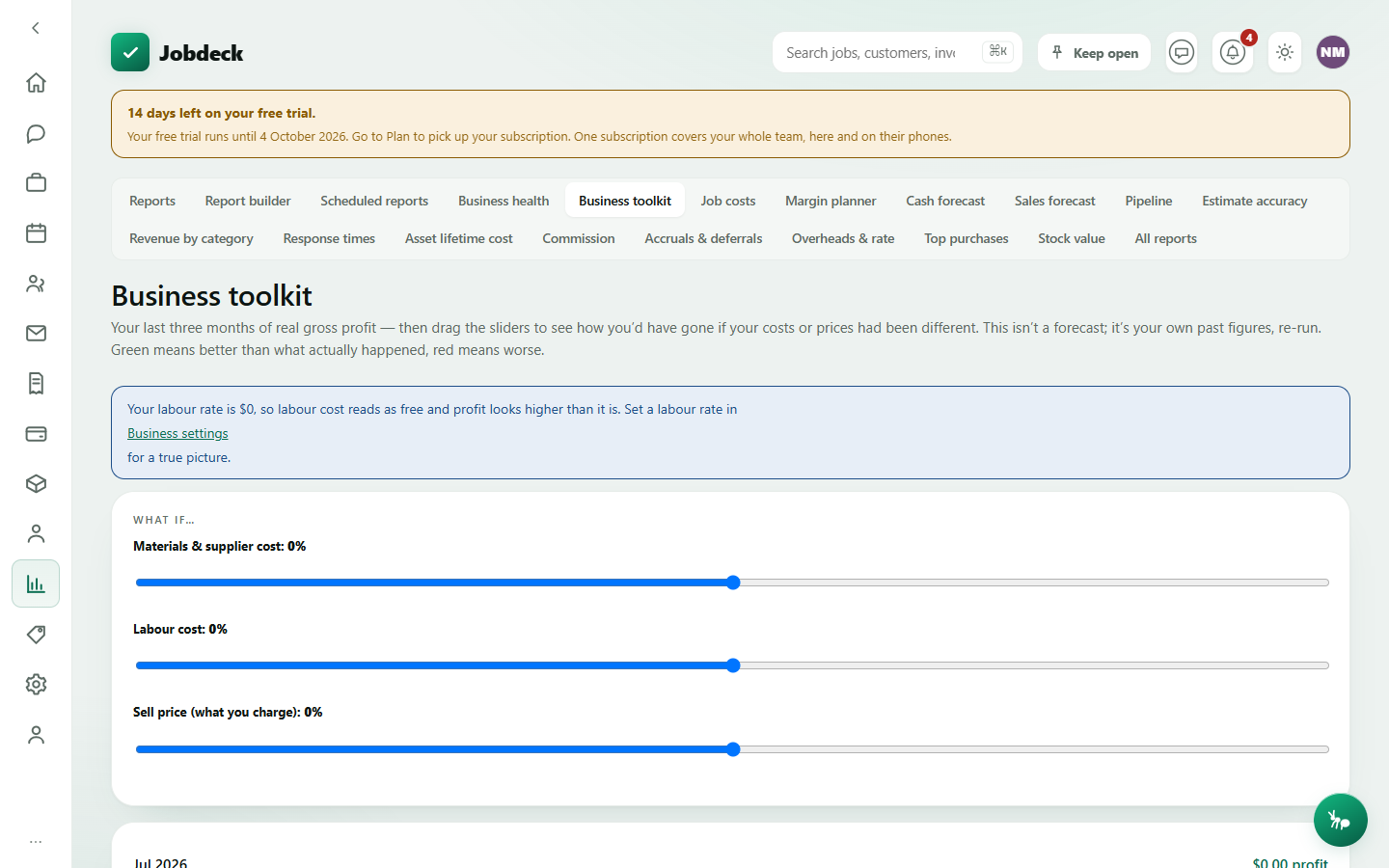
- Your last three months of real gross profit, replayed with what-if sliders over materials cost, labour cost and sell price. Not a forecast — it's your own job-costing data, re-run, so you can see how you'd have gone if you'd priced differently.
- Controls
- Three sliders, −50% to +50% each: materials & supplier cost, labour cost, sell price.
- Buttons
- Reset to actual.
- On the page
- A month-by-month bar of adjusted profit and margin, with a marker showing what actually happened. A warning banner if your labour rate is still $0 — labour reads as free and every month's profit looks better than it is until you set one.
- Takes you to
- Business settings, to set a labour rate.
Job costs /costs money
- What it's for
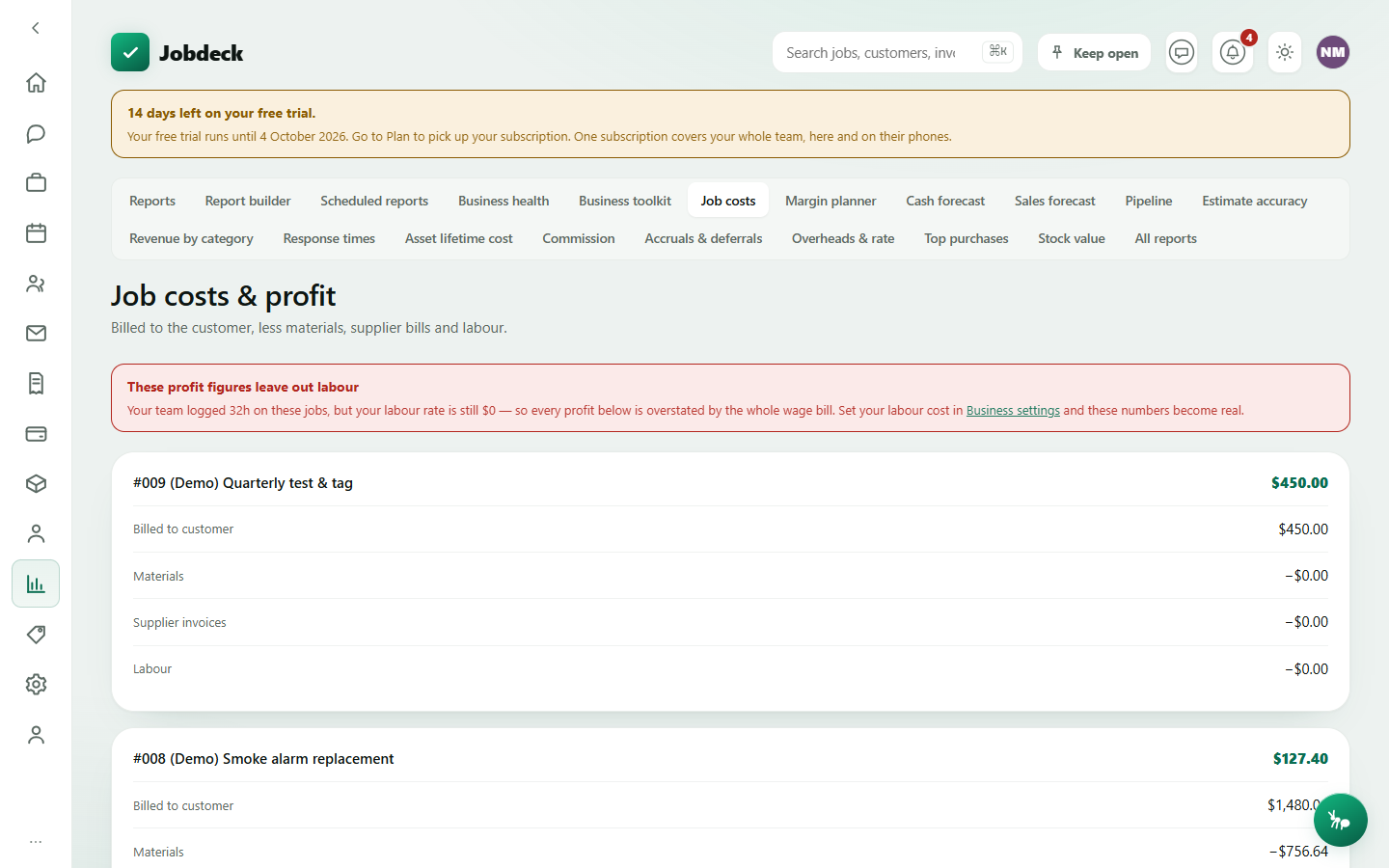
- Which jobs made a profit and which ones lost money, once materials, supplier bills and labour are counted against what you billed.
- On the page
- A card per job: billed to the customer, less materials, less supplier invoices, less labour, equals profit. A flag on any material line with no cost recorded, since that overstates the profit above it. A banner if your labour rate is still $0 and the crew logged real hours on these jobs — the profit figures below are leaving out the whole wage bill.
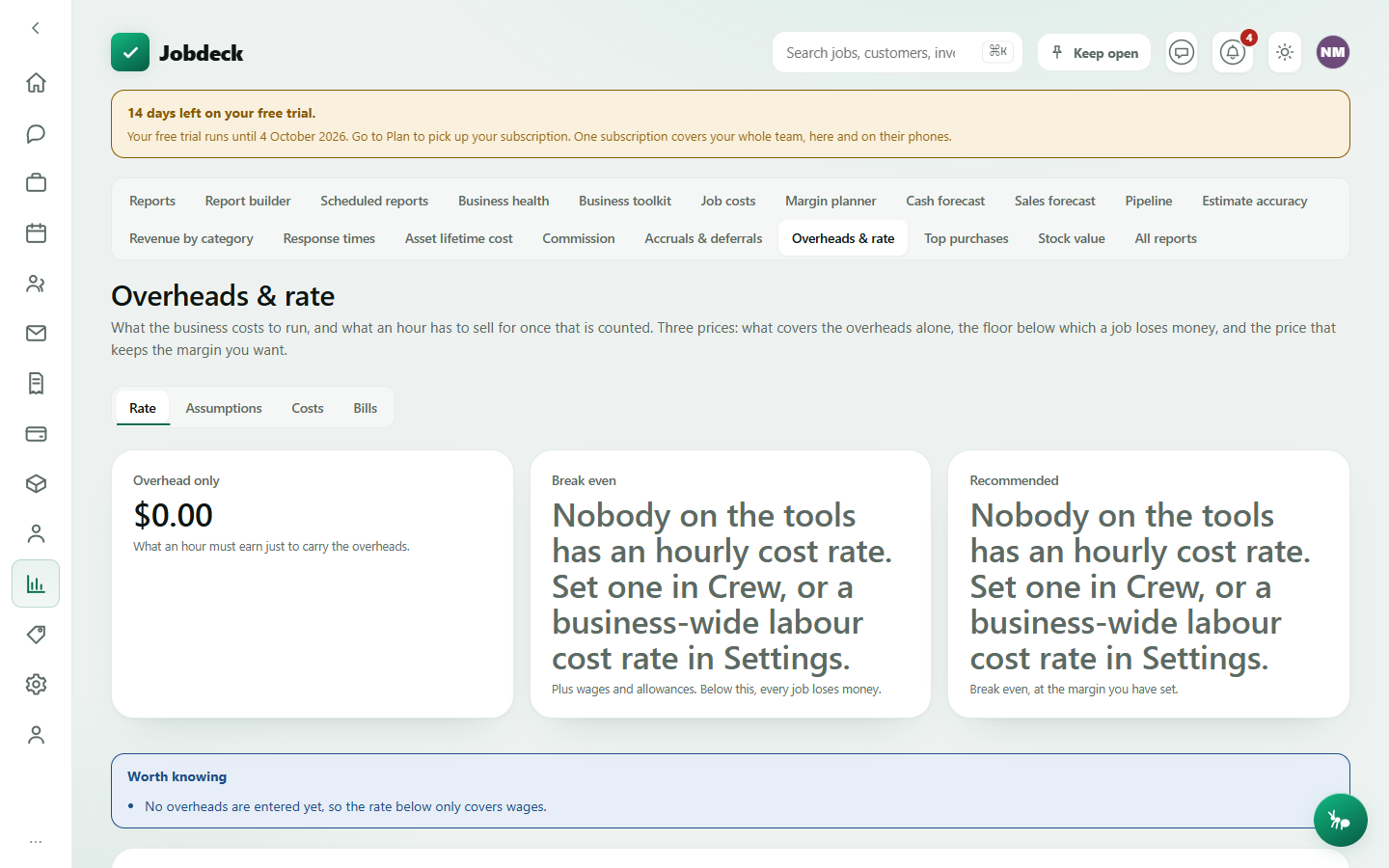
Overheads & rate /overhead-costs money
- What it's for
- Every cost the business carries outside a job — wages, licences, insurance, rego, software, rent — rolled up into what an hour has to sell for before you make a cent of profit. Three prices: what covers the overheads alone, the floor below which a job loses money, and the recommended rate at the margin you've set.
- Tabs
-
Rate — the three tier prices, today's charge-out rate against the recommended one, a per-person and per-pricing-level breakdown, industry benchmarks for your trade and state, and a history of rates you've applied.
Assumptions — hours and weeks worked, utilisation (or the detailed version: leave, sick, RDO, training and weather days lost), target margin, callback and bad-debt allowances, and an on-cost builder for what sits on top of a wage before it's a real cost (super, leave, workers comp, payroll tax).
Costs — the overhead register itself, grouped by category, with one-tap suggestions for plant, licences, test instruments and office wages you haven't costed yet, and what's renewing in the next 90 days.
Bills — the actual supplier bills that have arrived against overhead costs. - Buttons
- Use this rate (asks you to confirm, then writes straight into the business charge-out rate or a pricing level); Add a cost, Stop, Delete on the register; Download CSV.
Office wages count as an overhead here, not a billable head — an office wage doesn't inflate a job's labour cost. Without view_money or the accountant seat, the page shows a plain "you don't have access" card rather than a screen of blank figures.
The other fourteen, at a glance
Reached from the Search all reports link above, or the table below. All fourteen need the view_money permission; the "Accountant seat" column says whether the free read-only accountant seat can open it too.
| Report | What it shows | Who'd use it | Accountant seat |
|---|---|---|---|
| /report-builder Report builder |
Build a report nobody wrote for you — pick a number, break it down by customer, category, zone or person, and export it. | Anyone curious about a number the built-in reports don't already answer. | No permission needed at all. |
| /scheduled-reports Scheduled reports |
Have a chosen report emailed as a PDF on a recurring schedule instead of remembering to open it — weekly aged receivables, monthly job profit. | An owner or bookkeeper who wants a report to just arrive. | Yes |
| /margin Margin planner |
What the last few months would have made at a different margin — move material and labour margin and watch the profit move. | An owner deciding whether a price rise is worth it. | Yes |
| /cash-forecast Cash forecast |
Whether there's enough money coming in over the next few weeks to cover wages, suppliers and overheads going out. | An owner checking payroll is covered. | No |
| /sales-forecast Sales forecast |
What the quotes you've already sent are likely to be worth, month by month, weighted by how often you win them. | An owner planning ahead on likely income. | Yes |
| /pipeline Pipeline |
Are you quoting enough work, and are you winning it — enquiries through quotes through to jobs, as a rate over a period. | An owner checking the sales funnel is healthy. | Yes |
| /estimate-accuracy Estimate accuracy |
How close your quoted hours and costs came to what the job really took, so the next quote is less of a guess. | An owner or estimator tightening up quoting. | Yes |
| /revenue-by-category Revenue by category |
Which kind of work brings the money in — by work type and by job stream — and what share of revenue each one is. | An owner deciding where to focus marketing or hiring. | Yes |
| /response-times-report Response times |
How long customers wait between asking for something and somebody turning up, and how often you hit the target you set. | An owner running a maintenance contract with response-time obligations. | Yes |
| /asset-cost-report Asset lifetime cost |
What a customer's asset has cost to keep running over its whole life, so you can tell them when replacing it beats repairing it again. | An owner advising a customer on repair versus replace. | Yes |
| /commission Commission |
What each person has earned in commission, on which jobs, and what's still to be paid out. | An owner running payroll for commission-based staff. | No |
| /accruals Accruals & deferrals |
Cost you've run up but not yet been billed for, and money taken for work not yet done, spread across the days each one actually covers. | An owner or bookkeeper closing out a period's figures properly. | No |
| /top-purchases Top purchases |
What you spend the most on, which supplier you spend it with, and which items have no price on file. | An owner negotiating trade pricing with a wholesaler. | Yes |
| /stock-value-report Stock value |
What the stock on your shelves and in your vans is worth right now. | An owner keeping track of cash tied up in stock. | Yes |